


Complete Jewish Bible
4.862.00 Reviews
App Specs
- Version
- Complete Jewish Bible 10.0
- Updated On
- License
- Free
- Downloads
- 10,000+
- Developer
- KJV Bible offline
- Categories
- Libraries & Demo
- Platform
- Android
Screenshots




 Analysis by AppCompare
I approach the Complete Jewish Bible as a reading companion rather than a replacement for every Bible tool. Its focus is a Jewish-scripture reading experience in English, and that makes it most useful when I want to follow a passage, compare how its wording lands, or spend a few quiet minutes reading without carrying a print volume. The app sits in the Libraries & Demo category, is free to install, and is marked for Everyone. KJV Bible offline is the developer, and the current release is Complete Jewish Bible 7.0.
That focus is also the key to deciding whether it fits. If you want an easy way into this particular translation, or you are reading alongside someone who uses it, a dedicated app can be less distracting than a general-purpose Bible platform full of plans, community feeds, and extra material. If you need a scholarly study suite, a broad set of translations, or a carefully documented Hebrew-learning tool, I would compare it with those options before making it your only reference.
A repeatable reading routine
My simplest routine is to choose a book and chapter, read a short passage in context, then save a verse only if I have a clear reason to return to it. That last step matters: a long, unexplained bookmark list quickly becomes a second search problem. I find it more useful to bookmark passages for a question, a discussion, or a later reread than to save every line that catches my eye.
For a realistic everyday use, imagine having ten minutes before a class or a conversation with a friend. I would open the passage we plan to discuss, read the surrounding verses rather than lifting one sentence out of context, and note a phrase that needs follow-up. Later, search can help locate that wording again. This workflow is modest, but it makes the app useful without turning reading into a project that needs a large block of free time.
Small habits that make navigation easier
When I am reading continuously, I try to remember the book and chapter before leaving the app. When I am researching a topic, I search for a distinctive word or phrase instead of a broad theme; broad searches can bring up many passages and make it harder to compare them thoughtfully. If a result seems important, I return to its surrounding chapter before deciding what it means. Search is a way to find a passage, not a substitute for reading it in context.
I would also keep separate purposes for browsing and studying. A quick browse is good for discovering a passage, while a study session benefits from writing down the question I am trying to answer before I start. That simple habit keeps me from hopping between unrelated verses and mistaking a collection of search results for a complete interpretation. If I use bookmarks, I revisit them during the next reading session and remove ones that no longer serve a purpose.
What this focused approach does—and does not—solve
A dedicated English text can be easier to settle into than a large Bible app where the reading view competes with plans, notifications, or community features. The trade-off is that a focused reader may not suit someone who expects an all-in-one reference desk. I would not assume that an English rendering alone can answer questions about Hebrew grammar, textual history, or competing translations; for those, a specialist reference or a print study edition is the better companion.
Worth Reading Before You Choose

Flipboard Shows What News Apps Must Do Beyond the Feed

Switching to Android Auto Means Rethinking Your Driving Routine

Google Calendar Makes a Crowded Week Easier to Manage

Ludo King Makes the Most of the Minutes Between Plans

Baby Panda World Brings Quick Play to Modern Phones, but Its Game Library Feels Busy

ESPN’s Live Game View Makes Following Close Games Easier
The app’s audience rating is Everyone, and its average is 4.8 from around 387 ratings, with 61 written reviews. It has passed 10,000 installs. Those figures suggest that readers have found a practical audience for it, but I would still judge it by whether its text and reading workflow match what I need. It is free, with in-app purchases listed at $0.99 per item, so I would check the purchase details in the app before relying on any paid option. The minimum operating-system requirement is Android 6.0.
For me, the clearest reason to keep this app is its narrow purpose: it makes this Jewish Bible available for focused reading on a phone. I would recommend it to curious readers, study groups using the same text, and anyone who wants a portable place to return to passages. I would skip it as my primary tool if I needed extensive scholarly apparatus or a wide translation-comparison workflow. Its value is less about doing everything and more about making one kind of reading easy to return to.
A Unique Blend of Tradition and Technology
The moment I opened the Complete Jewish Bible app, I was welcomed by a sleek, user-friendly interface. It’s like having a digital library at your fingertips, but with a focus on Jewish scripture. The app offers the full text of the Bible, translated into English by Dr. David H. Stern. If you’re like me and enjoy reading different interpretations, this translation is a refreshing take.
Features That Stand Out
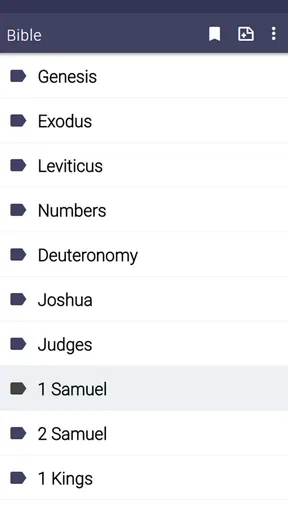
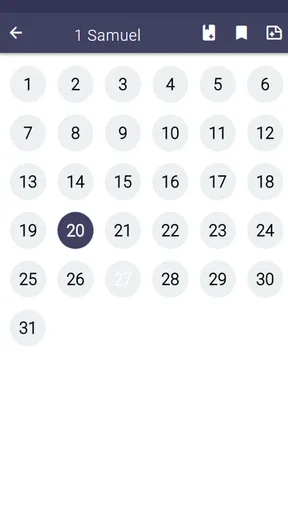
One of the first things I noticed was how easy it is to navigate. You can quickly jump to any book, chapter, or verse with just a few taps. It’s perfect for when you want to find something specific without flipping through pages endlessly.
- Bookmarking: Easily save your favorite passages to revisit them later.
- Search Functionality: Type in keywords or phrases to find exactly what you’re looking for.
- Daily Verses: Get inspired with daily verses that pop up when you open the app.
What’s more, the app also offers the ability to switch between Hebrew and English texts, which is a fantastic feature if you’re trying to learn Hebrew or just want to see the original script. It’s like having a bilingual Bible without needing to carry two hefty books around.
Personal Experience and Insights
While using the app, I found myself particularly drawn to the footnotes and cross-references. They provide a deeper understanding of the context and the historical background of the scriptures. If you’re someone who loves to dive into details, this aspect of the app is a real treat.
I also appreciated the audio feature. Sometimes, I like to just sit back and listen, letting the words wash over me. It’s a great way to reflect and relax, especially after a long day.
Why You Should Give It a Try
If you're interested in exploring Jewish scriptures, or if you simply want a new perspective on biblical texts, this app is definitely worth checking out. It combines the richness of tradition with the convenience of technology, making it accessible to both scholars and casual readers alike.
The Complete Jewish Bible app has genuinely enriched my understanding of the scriptures, offering insights I hadn’t considered before. It’s like having a knowledgeable friend guiding you through the texts, pointing out interesting facts and interpretations along the way.
So, if you’re ready to embark on a journey through the Jewish Bible, this app is a fantastic place to start. Who knows? You might find yourself as captivated as I did.
Reading with a question in mind
One useful way I have found to get more from a focused Bible app is to decide what kind of reading I am doing before opening it. For devotional reading, I can take a chapter at a comfortable pace and let a line stay with me. For a study-group preparation session, I can begin with the assigned passage, then use search to locate a repeated term or phrase that may connect it to another section. The difference is small but important: it prevents the convenience of instant search from turning reading into a hunt for isolated lines.
The English text is the practical starting point for most readers, while the Hebrew-and-English option can be helpful when I want to look at the original script alongside the translation. I would treat that as a visual aid, not as a complete language-learning course. Someone learning Hebrew still benefits from pronunciation guidance, grammar instruction, and a teacher or structured resource. For a reader who simply wants to notice the script while following an English passage, the side-by-side approach can make a familiar routine feel more attentive.
Settings and expectations to check
Before settling into a long reading habit, I would take a moment to explore the app’s available settings and decide what is comfortable for my eyes and reading pace. I would not assume every Bible app offers the same display controls or that a setting in one app exists in another. The practical test is simple: open a chapter, read several paragraphs, and adjust only what the app actually makes available. A comfortable, repeatable view is more useful than spending time chasing a perfect setup.
I would also check how the daily-verse prompt fits my routine. It can be a pleasant nudge when I want a brief starting point, but it is not the same as a reading plan that guides me through a larger section over time. If I am following a group schedule, I would use the assigned book and passage as my anchor rather than letting a daily prompt set the agenda. That keeps the feature supportive instead of making it feel like another task to keep up with.
Because the app is free and includes optional in-app purchases priced at $0.99 per item, I would distinguish between basic reading and anything that asks for payment before deciding whether it matters to me. I would not pay simply because an option is visible; first I would ask whether it improves a specific part of my own reading. That is especially sensible for a reader who mainly wants to open the text, search a phrase, and return to a saved passage.
Where it fits among Bible apps and books
Compared with a broad Bible app, this one is appealing when I want less choice and a consistent focus on the Complete Jewish Bible. Larger platforms are often the better pick for comparing many translations, following structured plans, or using extensive reference libraries in one place. A printed edition, meanwhile, can be easier for sustained reading, annotation, and seeing a larger stretch of text at once. I see the phone app as a convenient companion for short sessions and quick passage lookups, not a universal replacement for those alternatives.
That distinction matters for group use. If everyone in a study is reading the same translation, having it on a phone makes it easier to follow along when a physical copy is not nearby. If the group compares several translations or relies on detailed academic notes, I would bring another reference as well. The app can keep the assigned text close at hand, while a separate resource handles questions that need more than a translation and its associated reading tools.
Who will appreciate it most
I think the strongest fit is a reader who wants a portable, uncomplicated route into this particular English Bible: someone exploring Jewish scripture, returning to a passage during the day, or preparing for a conversation with a friend. It can also suit a reader who already has a larger study setup but wants a focused app for casual reading. Its 4.8 average and more than 10,000 installs indicate that it has found readers, though popularity alone cannot tell me whether its approach matches an individual’s needs.
I would be more cautious if I were choosing an app for a Hebrew course, detailed textual research, or a workflow built around comparing translations and consulting extensive scholarly resources. In those cases, this app may be a useful secondary reader, but I would choose a dedicated language tool, a research-oriented Bible platform, or a print study edition as the main reference. The right choice depends less on how many features an app claims and more on the questions I expect it to answer.
A practical way to make it a habit
For a simple routine, I would pick one short passage at a regular moment—perhaps during a commute break or before bed—read enough surrounding text to understand the scene, and save only a passage I intend to revisit. Once a week, I could return to those saved passages and ask whether they still connect to a question or reflection. This makes bookmarking purposeful and gives search a clear job: finding language I remember, rather than replacing a steady reading sequence.
For a study meeting, I would open the assigned chapter before the discussion, note one phrase that seems unfamiliar, and use any available cross-reference or footnote to guide a follow-up question. I would keep the question open rather than treating a note as the final answer. That is where this kind of app works best for me: it puts the passage and its supporting reading aids within easy reach, while leaving room for conversation, context, and other sources when the subject calls for them.
My considered recommendation
The app’s biggest strength is its focused convenience, and its main limitation is the same focus: it is most compelling when the Complete Jewish Bible is exactly what I want to read. I would install it if I wanted that text close at hand and valued a simple path to chapters, verses, saved passages, and reading aids. I would not choose it expecting a complete library for every kind of biblical research or a substitute for guided Hebrew study.
Overall, I would recommend giving it a try if your goal is steady, accessible reading rather than an all-purpose study workstation. Start with a passage you already know, explore the notes and cross-references at your own pace, and see whether the translation and layout encourage you to return. If they do, the app can become a useful part of a daily routine; if your needs are broader, it can still sit alongside a more comprehensive reference without needing to do everything itself.
Pros
- Comprehensive translation of Hebrew texts.
- User-friendly interface for easy navigation.
- Includes commentary and study notes.
- Offline access available for convenience.
- Regular updates with new features.
Cons
- Limited language options besides English.
- No audio version for on-the-go use.
- Some features require in-app purchases.
- Heavy on storage space for older devices.
- No dark mode for nighttime reading.
FAQs for Complete Jewish Bible
What is the Complete Jewish Bible app?
The Complete Jewish Bible app is a digital version of the translated text that combines the Old and New Testaments with traditional Jewish culture and customs. It is designed to offer readers a unique perspective by reflecting the Jewish roots of Christianity, making it an essential tool for study and reflection.
How user-friendly is the interface of the Complete Jewish Bible app?
The Complete Jewish Bible app is designed with a user-friendly interface, featuring easy navigation and search functionality. Users can quickly find specific books, chapters, or verses. Additionally, the app includes customizable settings, such as font size and background color, to enhance the reading experience.
Does the app include any additional study tools or resources?
Yes, the Complete Jewish Bible app often includes a variety of study tools and resources, such as daily reading plans, bookmarks, and the ability to highlight text. Some versions may also offer audio options and commentaries to deepen understanding and facilitate more engaging study sessions.
Is the app available offline?
The Complete Jewish Bible app is typically available for offline use, allowing users to access the scriptures without an internet connection. This feature is particularly beneficial for those who travel frequently or have limited internet access, ensuring continuous availability of the text for study and reflection.
Are there any in-app purchases or ads in the Complete Jewish Bible app?
While the basic features of the Complete Jewish Bible app are often free, some versions may offer in-app purchases for additional resources or ad-free experiences. Users should check the app description for specific details about any potential costs or advertisements within the app.


